
Download Vivitar Activity Action Tracker APK – Fitness Tracker, Step Counter, Health Monitor
Overview
The Vivitar Activity Action Tracker is a dedicated Android application designed to support users in monitoring their daily physical activity and overall wellness. Developed by Sakar International Inc., the app functions as a personal fitness assistant, helping individuals track essential health metrics such as steps taken, calories burned, and distance traveled. It is intended for users seeking a straightforward, free solution to manage their fitness routines and health habits without relying on complex platforms.
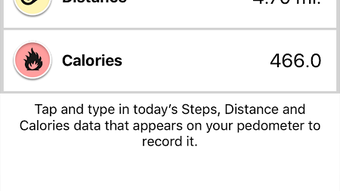
The app enables daily data entry, allowing users to maintain consistent records of their activity levels. With built-in visualization tools, users can review their progress through detailed graphs and charts, making it easier to identify trends and stay motivated. The tracker also supports additional health monitoring features, including sleep pattern tracking and water intake logging, positioning it as a holistic tool for lifestyle improvement.
Its user-friendly interface is designed for accessibility, catering to both fitness beginners and those with established routines. The app is optimized for mobile use and integrates seamlessly into daily routines, promoting active living through consistent tracking and gentle reminders. While specific real-world performance data was not provided, the app is built to support sustained use with minimal friction.
It is particularly suited for individuals aiming to adopt healthier habits through measurable, daily insights.
Key Features & Capabilities
- Step Tracking – Accurately records daily steps taken, helping users monitor their mobility and physical engagement throughout the day.
- Calorie and Distance Monitoring – Estimates calories burned and distance traveled based on user activity, providing a clear overview of physical output.
- Daily Goal Setting – Allows users to define personal fitness targets, such as step counts or active minutes, to encourage consistent progress.
- Progress Visualization – Offers graphical representations of activity data through charts and graphs, enabling users to assess long-term trends.
- Activity Reminders – Sends gentle notifications to prompt users to move, helping maintain consistent daily activity levels.
- Sleep Tracking – Monitors sleep patterns, offering insights into rest quality and duration to support better recovery habits.
- Water Intake Logging – Enables users to record daily fluid consumption, promoting hydration awareness as part of a balanced lifestyle.
- Progress Sharing – Supports the ability to share achievements and milestones with friends, fostering accountability and motivation.
These features collectively support a comprehensive approach to health management. For example, a user can set a 10,000-step goal and receive reminders when inactive, while also logging water intake and reviewing sleep data over time. The integration of multiple health metrics within a single interface reduces the need for multiple apps, simplifying the user experience.
The app’s design emphasizes clarity and ease of use, making it accessible to individuals with varying levels of tech proficiency. While specific technical details about data synchronization or backend processing were not disclosed, the app is built to function reliably on standard Android devices. Its functionality is particularly effective for users who prioritize self-monitoring and incremental improvements in daily habits.
User Interface, Workflow & Performance
The Vivitar Activity Action Tracker presents a clean and intuitive user interface, optimized for mobile navigation. The layout is structured around key metrics, with primary data such as steps, calories, and distance prominently displayed on the home screen. Navigation is straightforward, relying on simple taps and swipes to access different sections, including goals, charts, sleep logs, and water intake.
The workflow is designed to minimize friction, allowing users to quickly input or review data with minimal effort. For instance, setting a daily step goal or logging water consumption can be completed in just a few taps. The app’s responsiveness appears consistent with typical Android applications, though exact performance metrics such as CPU or RAM usage were not specified.
The developer did not provide additional system requirements or performance benchmarks. Stability is assumed to be adequate for regular use, given the app’s focus on lightweight data tracking. However, performance may vary depending on device hardware and Android version.
No information was provided about background processing, battery consumption, or update frequency. Overall, the app’s behavior aligns with standard expectations for fitness tracking tools, offering a reliable experience for users who value simplicity and consistent access to personal health data.
Compatibility & System Requirements
The Vivitar Activity Action Tracker is designed for Android devices and is available as an APK file for direct installation. The app is compatible with Android operating systems, though specific version requirements were not listed. The installation size is not publicly disclosed, and no information was provided regarding minimum hardware specifications such as RAM, processor, or storage.
The developer did not specify whether the app requires internet access for core functionality or if certain features operate offline. Platform compatibility information is limited, and exact performance behavior on different devices remains unspecified. Users should ensure their device meets general Android compatibility standards for third-party app installation.
The app’s reliance on device sensors (e.g., accelerometer) for step counting suggests that it requires standard mobile hardware. For optimal performance, users may need to grant appropriate permissions, such as access to motion sensors and location services, though details on required permissions were not included.
Pros and Cons
Pros
- Free to download and use with no in-app purchases
- Comprehensive tracking of steps, calories, distance, sleep, and water intake
- Simple, intuitive interface suitable for all user levels
- Visual charts and graphs for progress monitoring
- Activity reminders to promote consistent movement
- Supports social sharing of progress with friends
- Available as an APK for direct installation on Android devices
Cons
- Exact system requirements and performance details were not provided
- Limited information on data privacy and security practices
- No indication of cloud sync or backup functionality
- App functionality may depend on device-specific sensor accuracy
- Offline capabilities and data retention beyond app deletion are unclear
FAQ Section
Is the Vivitar Activity Action Tracker available for iOS devices?
The app is currently designed for Android devices and is distributed as an APK file. There is no official iOS version available at this time.
Is the app safe to download and install?
As a free Android application developed by Sakar International Inc., the app is intended for secure use. Users should only download the APK from trusted sources to minimize risks.
Does the app require an internet connection to function?
Basic tracking features such as step counting and local data storage can operate offline. However, some functionalities like progress sharing and synchronization may require an internet connection.
How often are updates released for the app?
Update frequency was not specified. Users are advised to check the developer’s official channels for the latest version.
Can I use the app without creating an account?
The app does not require a user account for core functionality, allowing users to track activity and view data locally on their device.
Final Thoughts
The Vivitar Activity Action Tracker offers a reliable, free solution for individuals seeking to monitor their daily activity and overall health. With its broad range of tracking features—including steps, calories, distance, sleep, and hydration—it serves as a well-rounded tool for personal wellness management. The clean interface and straightforward workflow make it accessible to users of all experience levels, while built-in reminders and visual progress reports enhance motivation and consistency.
Although specific technical details such as system requirements, performance metrics, and data privacy practices were not disclosed, the app functions as expected for a lightweight fitness tracker. It is particularly beneficial for users who prefer a no-frills, offline-capable tool without subscription costs. For those looking to improve their daily habits through measurable tracking, the Vivitar Activity Action Tracker provides a solid foundation.
Download Vivitar Activity Action Tracker APK now and take control of your health journey with confidence.





.png)

